“How an AI decides to act – and how you stay in control when it does.”
We’ve talked about tools as “the thing that lets an agent act instead of just talk.” Now let’s get precise about what actually happens, step by step, when an agent uses one. This is often called function calling or tool use, and it’s the mechanical heart of every agentic system.
Step 1: You describe the tools you have
Before an agent can use a tool, you have to tell the model it exists-and, crucially, describe it clearly enough that the model knows when and how to reach for it. This description usually includes:
- A name (
get_weather) - A description (“Gets the current weather for a given city”)
- The inputs it expects (
city: a string, required) - What it returns (temperature, conditions, etc.)
This is passed to the model alongside your actual question as a kind of menu of available actions.
Step 2: The model decides to use one
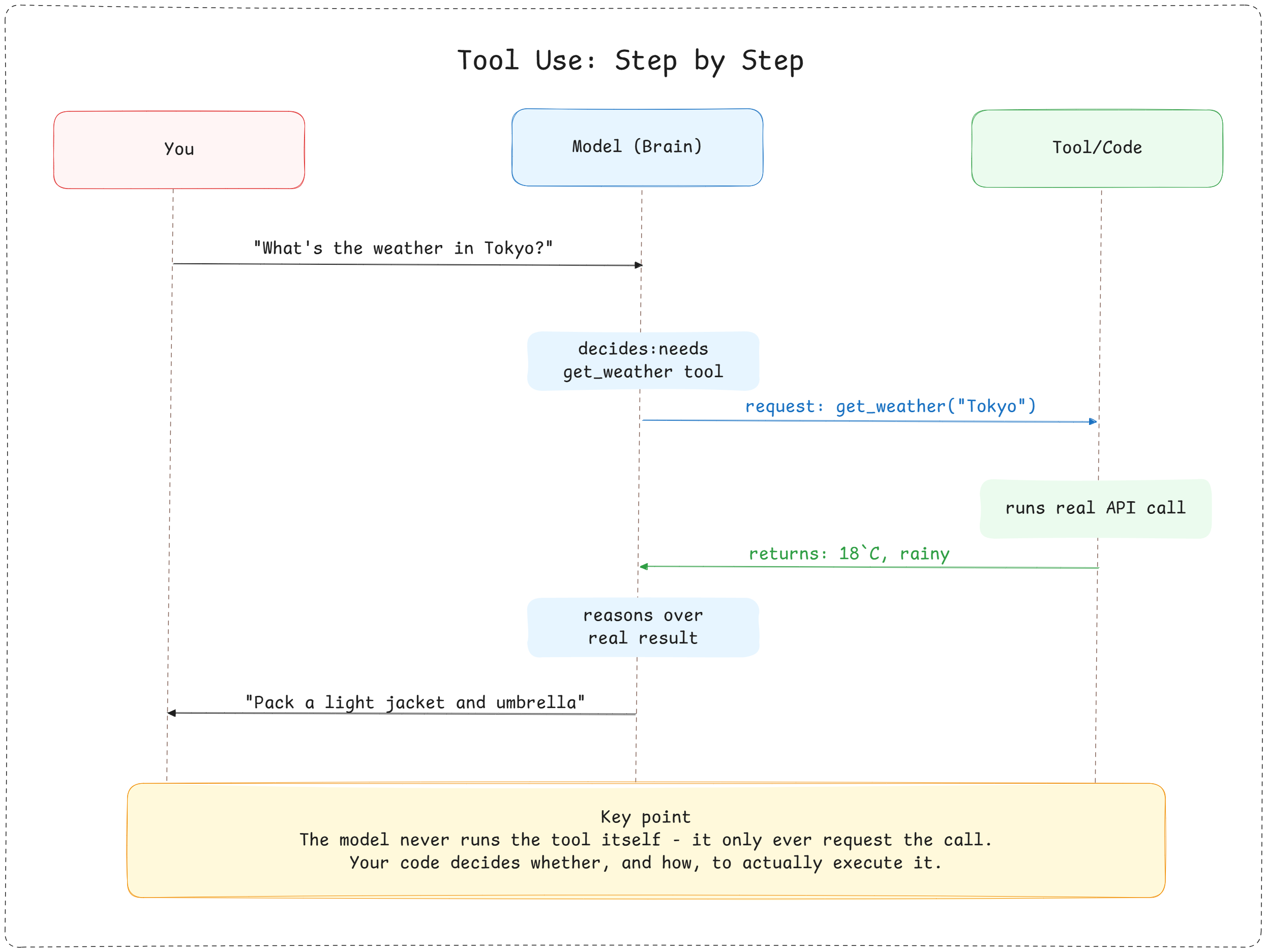
When you ask, “What should I wear in Tokyo today?”, the model reads your question, looks at its menu of tools, and recognises that it get_weather is relevant. Instead of replying with text, it replies with a structured request — something like:
{
  "tool": "get_weather",
  "input": { "city": "Tokyo" }
}
This is the pivotal moment: the model isn’t answering you yet. It’s asking the system to go get information it needs first.
Step 3: Your code actually runs it
Here’s something people are often surprised by: the model itself never calls the tool. It only ever asks for the tool to be called. Your code (or the agent framework you’re using) is what actually executes the function – hitting a real weather API, running real code, querying a real database — and gets back a real result.
This separation matters. It’s what keeps a human (or at least deliberately-written code) in control of what actually happens in the world. The model can request that an email get sent; whether it actually sends is up to the surrounding system, which is exactly where you’d add safety checks, confirmations, or permission gates for anything sensitive.
Step 4: The result goes back to the model
Once your code has the real answer – say, – it’s fed back to the model as if it were a new piece of the conversation. The model now has real, current information it didn’t have before and can reason over it: “18°C and rainy — I’d recommend a light jacket and an umbrella.”
Step 5: Repeat if needed, then respond
If the task needs more tools, the same cycle happens again: think, request a tool, get a real result, fold it in. Once the model has everything it needs, it produces a normal text response instead of a tool request, and that’s the signal that the loop is finished (this is the “Observation → back to Thought” arrow from the ReAct loop we covered last time).
Why this design is so powerful
Function calling turns a language model from something that can only describe actions into something that can trigger them, while keeping a clean boundary between “deciding what to do” (the model’s job) and “actually doing it” (your code’s job). That boundary is where you get to add the following:
- Validation — checking the model’s requested inputs make sense before running anything
- Permissions — requiring human confirmation before sensitive actions (sending money, deleting data, sending an email)
- Logging — a clear record of every action taken, since each one is an explicit, structured request rather than buried in free text
This is also why tool descriptions matter so much in practice. A vague or ambiguous tool description leads to a model calling the wrong tool, or calling the right tool with the wrong inputs. Writing good tool descriptions is a skill of its own — arguably as important as prompt writing.
So far, every tool call we’ve discussed only has access to information available right now – the current conversation or a live API. But what happens when an agent needs to recall something it learnt days ago or search across a huge pile of documents? That’s where memory and retrieval come in.
Next up: Memory & RAG: How Agents Remember →
Comments (...)
You must be signed in to join the discussion.