In this tutorial you’ll build a working Kubernetes Operator in Go, starting from an empty folder and ending with a self-healing controller running inside your cluster.
In the last post on Operators, we covered the what: an Operator is a custom controller that packages the knowledge of a human expert into software, so the cluster can run an application the way that expert would. This post is the how.
By the end you’ll have an Operator that adds a new resource type called Website. Create one, and the Operator spins up a Deployment and a Service for it. Break those by hand, and it repairs them. Delete the Website, and everything it created goes with it.
The example is small on purpose. The patterns you’ll use here are the same ones behind production Operators like cert-manager, CloudNativePG and the Prometheus Operator.
What we’re building
Start with the contract. A user writes this:
apiVersion: web.example.com/v1alpha1
kind: Website
metadata:
  name: hello-ceytech
spec:
  image: nginx:1.27-alpine
  replicas: 2
  port: 80
The Operator’s job is to make sure the cluster always contains three things:
- A Deployment named
hello-ceytech, running 2 replicas of that image - A Service named
hello-ceytech, routing traffic to those Pods - An up-to-date status on the
Website, showing how many replicas are available
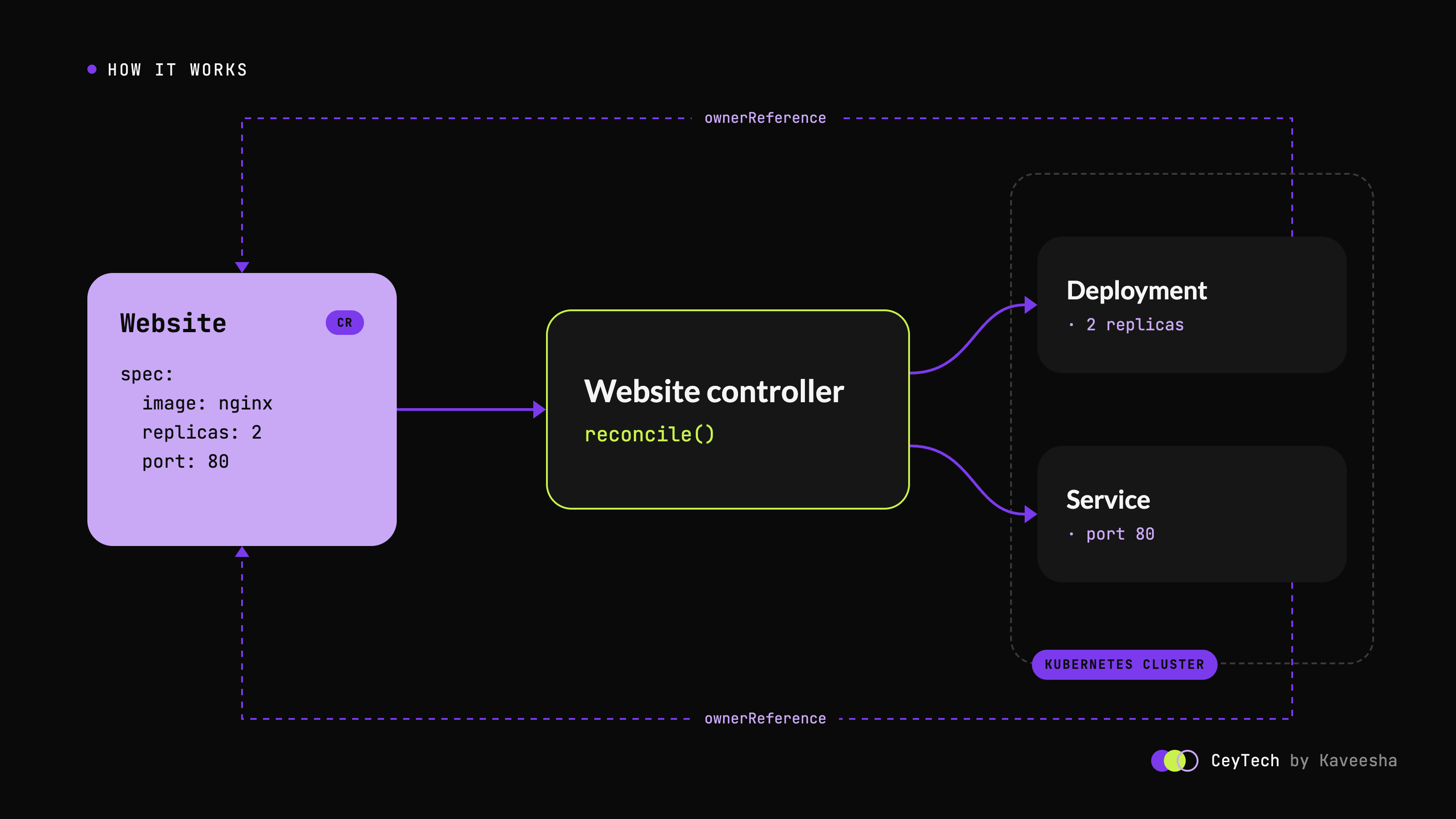
The user never touches the Deployment or the Service directly. They describe what they want, and the Operator owns how it happens. Think of it like ordering at a restaurant: you say “two plates of kottu”, and the kitchen deals with the stove, the timing and the burnt batch that needs redoing.
Why Kubebuilder?
You could write a controller from scratch with client-go, but most of your time would go into plumbing: informers, caches, work queues, leader election, RBAC manifests and CRD YAML.
Kubebuilder is a Kubernetes SIG project that scaffolds all of that for you. It’s built on controller-runtime, the library behind most Go-based Operators, including those built with Operator SDK (which uses Kubebuilder under the hood).
That leaves you with two jobs:
- Define your API, as Go structs describing the custom resource.
- Write your Reconcile function, the logic that makes reality match the spec.
Everything else is generated.
Prerequisites
You’ll need these installed:
- Go, a recent version. Current Kubebuilder v4 scaffolds expect Go 1.25 or newer, and the generated
go.modtells you the exact minimum. - Docker or another container runtime
- kubectl
- kind for a local cluster (any cluster you can reach works too)
- Kubebuilder v4
Install Kubebuilder:
curl -L -o kubebuilder "https://go.kubebuilder.io/dl/latest/$(go env GOOS)/$(go env GOARCH)"
chmod +x kubebuilder && sudo mv kubebuilder /usr/local/bin/
kubebuilder version
Then create a local cluster:
kind create cluster --name operator-lab
kubectl cluster-info --context kind-operator-lab
If kubectl cluster-info prints a control plane address, you’re ready.
Step 1: Scaffold the project
mkdir website-operator && cd website-operator

kubebuilder init \
  --domain example.com \
  --repo github.com/example/website-operator
Replace
example.comandgithub.com/example/website-operatorwith your own domain and repository path. The domain becomes part of your API group, so pick one you control.
This generates a complete Go project: a Makefile, a Dockerfile, the manager entry point in cmd/main.go, and a config/ directory full of Kustomize manifests for RBAC, the manager Deployment and more.
To verify, run make build. It should compile without errors and drop a binary in bin/.
Step 2: Create the API
kubebuilder create api \
  --group web \
  --version v1alpha1 \
  --kind Website \
  --resource --controller
This adds the two files you’ll spend most of your time in:
website-operator/
├── api/
│   └── v1alpha1/
│       └── website_types.go          <- your API (the "what")
├── internal/
│   └── controller/
│       └── website_controller.go     <- your logic (the "how")
├── config/
│   ├── crd/                          <- generated CRD YAML
│   ├── rbac/                         <- generated RBAC
│   └── samples/                      <- example custom resources
├── cmd/main.go                       <- manager entry point
└── Makefile
Your full API group is now web.example.com, version v1alpha1, kind Website. You should see both new files on disk, plus a sample at config/samples/web_v1alpha1_website.yaml.
Step 3: Define the API
Open api/v1alpha1/website_types.go and replace the scaffolded WebsiteSpec and WebsiteStatus with this:
// WebsiteSpec defines the desired state of a Website.
type WebsiteSpec struct {
  // Image is the container image that serves the site.
  // +kubebuilder:validation:MinLength=1
  Image string `json:"image"`

  // Replicas is the number of Pods to run.
  // +kubebuilder:validation:Minimum=1
  // +kubebuilder:validation:Maximum=10
  // +kubebuilder:default=1
  // +optional
  Replicas *int32 `json:"replicas,omitempty"`

  // Port is the port the container listens on.
  // +kubebuilder:validation:Minimum=1
  // +kubebuilder:validation:Maximum=65535
  // +kubebuilder:default=80
  // +optional
  Port int32 `json:"port,omitempty"`
}

// WebsiteStatus defines the observed state of a Website.
type WebsiteStatus struct {
  // AvailableReplicas is the number of Pods ready to serve traffic.
  // +optional
  AvailableReplicas int32 `json:"availableReplicas,omitempty"`

  // Conditions represent the latest observations of the Website's state.
  // +listType=map
  // +listMapKey=type
  // +optional
  Conditions []metav1.Condition `json:"conditions,omitempty"`
}
Next, add printer columns to the markers just above the Website struct, so kubectl get websites shows something useful:
// +kubebuilder:object:root=true
// +kubebuilder:subresource:status
// +kubebuilder:printcolumn:name="Image",type=string,JSONPath=`.spec.image`
// +kubebuilder:printcolumn:name="Desired",type=integer,JSONPath=`.spec.replicas`
// +kubebuilder:printcolumn:name="Available",type=integer,JSONPath=`.status.availableReplicas`
// +kubebuilder:printcolumn:name="Age",type=date,JSONPath=`.metadata.creationTimestamp`

// Website is the Schema for the websites API.
type Website struct {
  // leave the scaffolded fields as they are
}
Those comments aren’t just comments
The +kubebuilder lines are markers. When you run make manifests, a tool called controller-gen reads them and turns them into real YAML:
validation:Minimum=1becomes OpenAPI validation in the CRD, so the API server itself rejectsreplicas: 0before your code ever sees it.default=1makes the API server fill in a value when the user leaves it out.subresource:statusseparatesstatusfromspec, so users write the spec and only your controller writes the status.
Regenerate the code and the CRD:
make generate   # deep-copy functions
make manifests  # CRD and RBAC YAML
To verify, open config/crd/bases/web.example.com_websites.yaml. You should find minimum: 1 and default: 1 under the replicas field.
Step 4: Get the mental model right
Before writing the controller, it’s worth understanding reconciliation properly, because this is the part most people get wrong.
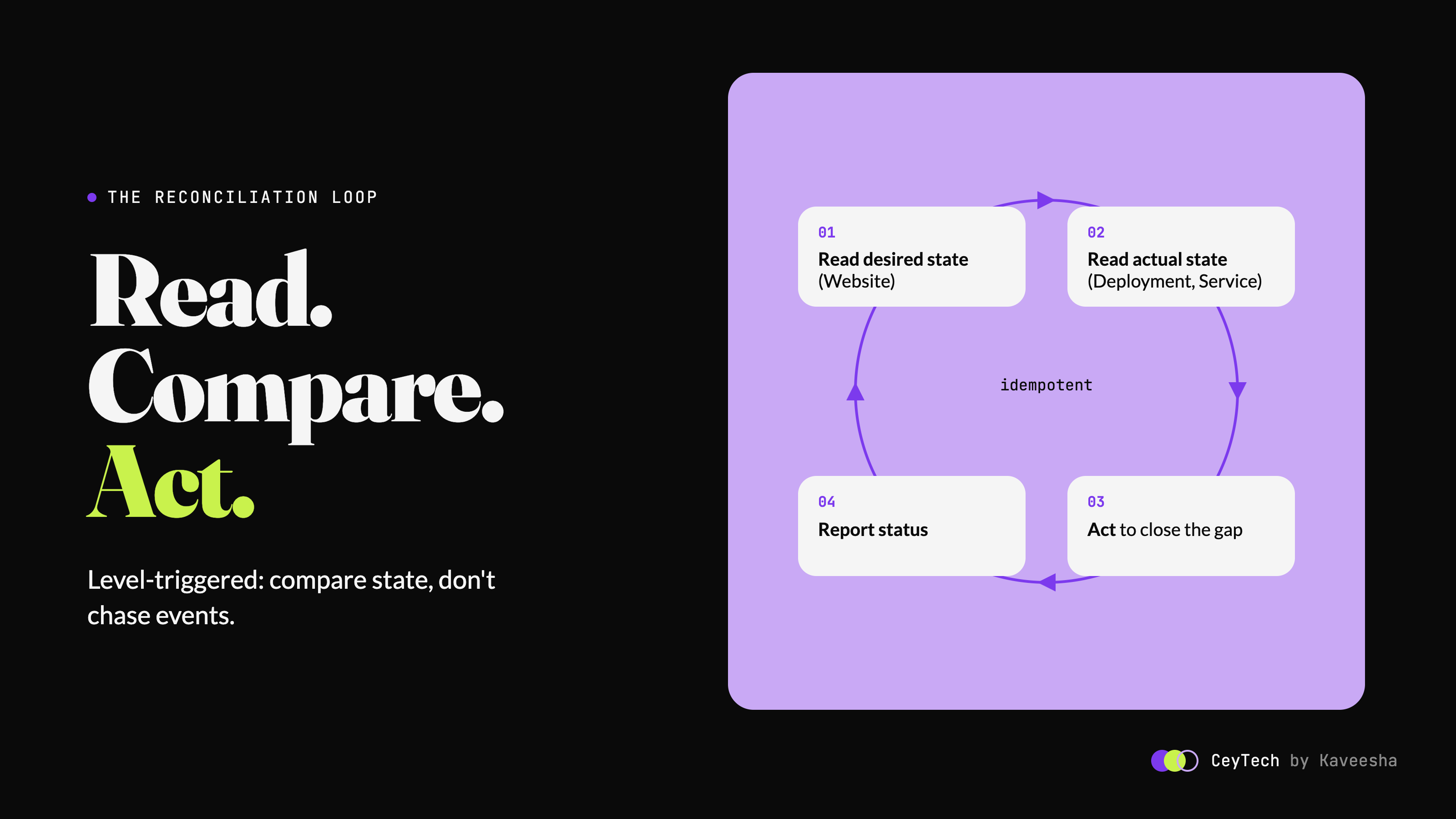
A controller doesn’t react to events like “the user changed replicas from 2 to 3”. It reacts to “something about this object might have changed, go and look”. Your Reconcile function only receives a name and a namespace. Every time it runs, it should:
- Read the desired state (the
Website). - Read the actual state (the Deployment and Service).
- Act to close the gap.
- Report what it observed in the status.
This is called level-triggered reconciliation. It’s like a thermostat: it doesn’t care who opened the window, it just compares the room temperature with the setting and adjusts.
There’s one golden rule that follows from this. Reconcile must be idempotent. Running it once or a hundred times in a row must produce the same result. That’s what makes Operators resilient: if a reconcile fails halfway through, the next one simply starts again from whatever reality looks like now.
Step 5: Write the controller
Open internal/controller/website_controller.go. We’ll replace its contents in three parts. First, the imports, the struct and the RBAC markers. Update the webv1alpha1 import path to match your --repo.
package controller

import (
  "context"

  appsv1 "k8s.io/api/apps/v1"
  corev1 "k8s.io/api/core/v1"
  "k8s.io/apimachinery/pkg/api/meta"
  metav1 "k8s.io/apimachinery/pkg/apis/meta/v1"
  "k8s.io/apimachinery/pkg/runtime"
  "k8s.io/apimachinery/pkg/util/intstr"
  ctrl "sigs.k8s.io/controller-runtime"
  "sigs.k8s.io/controller-runtime/pkg/client"
  "sigs.k8s.io/controller-runtime/pkg/controller/controllerutil"
  logf "sigs.k8s.io/controller-runtime/pkg/log"

  webv1alpha1 "github.com/example/website-operator/api/v1alpha1"
)

// WebsiteReconciler reconciles a Website object.
type WebsiteReconciler struct {
  client.Client
  Scheme *runtime.Scheme
}

// +kubebuilder:rbac:groups=web.example.com,resources=websites,verbs=get;list;watch;create;update;patch;delete
// +kubebuilder:rbac:groups=web.example.com,resources=websites/status,verbs=get;update;patch
// +kubebuilder:rbac:groups=web.example.com,resources=websites/finalizers,verbs=update
// +kubebuilder:rbac:groups=apps,resources=deployments,verbs=get;list;watch;create;update;patch;delete
// +kubebuilder:rbac:groups=core,resources=services,verbs=get;list;watch;create;update;patch;delete
Next, the first half of Reconcile. It reads the Website and makes sure the Deployment matches it:
func (r *WebsiteReconciler) Reconcile(ctx context.Context, req ctrl.Request) (ctrl.Result, error) {
  log := logf.FromContext(ctx)

  // 1. Read the desired state.
  var site webv1alpha1.Website
  if err := r.Get(ctx, req.NamespacedName, &site); err != nil {
    // Deleted? Nothing to do. Owner references clean up the children.
    return ctrl.Result{}, client.IgnoreNotFound(err)
  }

  labels := map[string]string{
    "app.kubernetes.io/name":       "website",
    "app.kubernetes.io/instance":   site.Name,
    "app.kubernetes.io/managed-by": "website-operator",
  }

  // 2. Make sure the Deployment matches the spec.
  deploy := &appsv1.Deployment{
    ObjectMeta: metav1.ObjectMeta{Name: site.Name, Namespace: site.Namespace},
  }
  op, err := controllerutil.CreateOrUpdate(ctx, r.Client, deploy, func() error {
    deploy.Labels = labels
    deploy.Spec.Replicas = site.Spec.Replicas
    deploy.Spec.Selector = &metav1.LabelSelector{MatchLabels: labels}
    deploy.Spec.Template.Labels = labels

    if len(deploy.Spec.Template.Spec.Containers) == 0 {
      deploy.Spec.Template.Spec.Containers = []corev1.Container{{Name: "web"}}
    }
    c := &deploy.Spec.Template.Spec.Containers[0]
    c.Image = site.Spec.Image
    c.Ports = []corev1.ContainerPort{{
      Name: "http", ContainerPort: site.Spec.Port, Protocol: corev1.ProtocolTCP,
    }}

    // The Website owns this Deployment.
    return controllerutil.SetControllerReference(&site, deploy, r.Scheme)
  })
  if err != nil {
    return ctrl.Result{}, err
  }
  if op != controllerutil.OperationResultNone {
    log.Info("Deployment reconciled", "operation", op)
  }
Finally, the second half: the Service, the status, and the wiring that tells the manager what to watch.
  // 3. Make sure the Service matches the spec.
  svc := &corev1.Service{
    ObjectMeta: metav1.ObjectMeta{Name: site.Name, Namespace: site.Namespace},
  }
  if _, err := controllerutil.CreateOrUpdate(ctx, r.Client, svc, func() error {
    svc.Labels = labels
    svc.Spec.Selector = labels
    svc.Spec.Ports = []corev1.ServicePort{{
      Name: "http", Port: 80, Protocol: corev1.ProtocolTCP,
      TargetPort: intstr.FromInt32(site.Spec.Port),
    }}
    return controllerutil.SetControllerReference(&site, svc, r.Scheme)
  }); err != nil {
    return ctrl.Result{}, err
  }

  // 4. Report what we observed.
  desired := int32(1)
  if site.Spec.Replicas != nil {
    desired = *site.Spec.Replicas
  }
  site.Status.AvailableReplicas = deploy.Status.AvailableReplicas

  condition := metav1.Condition{
    Type: "Available", Status: metav1.ConditionFalse, Reason: "Progressing",
    Message: "Waiting for replicas to become available", ObservedGeneration: site.Generation,
  }
  if deploy.Status.AvailableReplicas >= desired {
    condition.Status, condition.Reason = metav1.ConditionTrue, "AllReplicasAvailable"
    condition.Message = "All replicas are available"
  }
  meta.SetStatusCondition(&site.Status.Conditions, condition)

  // Conflicts are normal here; returning the error triggers a retry.
  return ctrl.Result{}, r.Status().Update(ctx, &site)
}

// SetupWithManager wires the controller into the manager.
func (r *WebsiteReconciler) SetupWithManager(mgr ctrl.Manager) error {
  return ctrl.NewControllerManagedBy(mgr).
    For(&webv1alpha1.Website{}). // reconcile when a Website changes
    Owns(&appsv1.Deployment{}).  // or when a Deployment it owns changes
    Owns(&corev1.Service{}).     // or when a Service it owns changes
    Named("website").
    Complete(r)
}
What’s actually happening here
CreateOrUpdate fetches the object, runs your mutate function, then creates it if it doesn’t exist, or updates it only if something actually changed. Notice that we set individual fields rather than replacing whole structs. That preserves the defaults the API server adds, and avoids a pointless update on every loop.
SetControllerReference stamps an owner reference on the Deployment and Service, pointing back to the Website. That gives you two things for free:
- Garbage collection. Delete the
Websiteand Kubernetes deletes its children. No cleanup code needed. - Watches. Because of
Owns(...)inSetupWithManager, any change to an owned Deployment triggers a reconcile of its parentWebsite. That’s how the Operator notices tampering.
The RBAC markers above Reconcile declare exactly what the controller is allowed to do, and make manifests turns them into a ClusterRole. Forget one, and the controller hits forbidden errors at runtime.
Conditions follow the standard Kubernetes convention, so tools like kubectl wait --for=condition=Available work with your resource out of the box.
To verify, run make build again. It should compile cleanly.
Step 6: Run it locally
Regenerate the manifests (the RBAC markers changed), install the CRD into the cluster, and run the controller on your machine:
make manifests
make install   # applies the CRD to the cluster
make run       # runs the controller locally using your kubeconfig
Leave that terminal running. In a second terminal, replace the contents of config/samples/web_v1alpha1_website.yaml with the example from the start of this post, then apply it:
kubectl apply -f config/samples/web_v1alpha1_website.yaml
Check what the Operator built:
kubectl get websites
# NAME            IMAGE               DESIRED   AVAILABLE   AGE
# hello-ceytech   nginx:1.27-alpine   2         2           20s

kubectl get deployment,service -l app.kubernetes.io/instance=hello-ceytech
Then hit the site:
kubectl port-forward service/hello-ceytech 8080:80
Open http://localhost:8080 and you should see the nginx welcome page. You’ll also see Deployment reconciled lines in the controller’s log.
Step 7: Break it on purpose
This is the moment Operators click. Try to sabotage your own work.
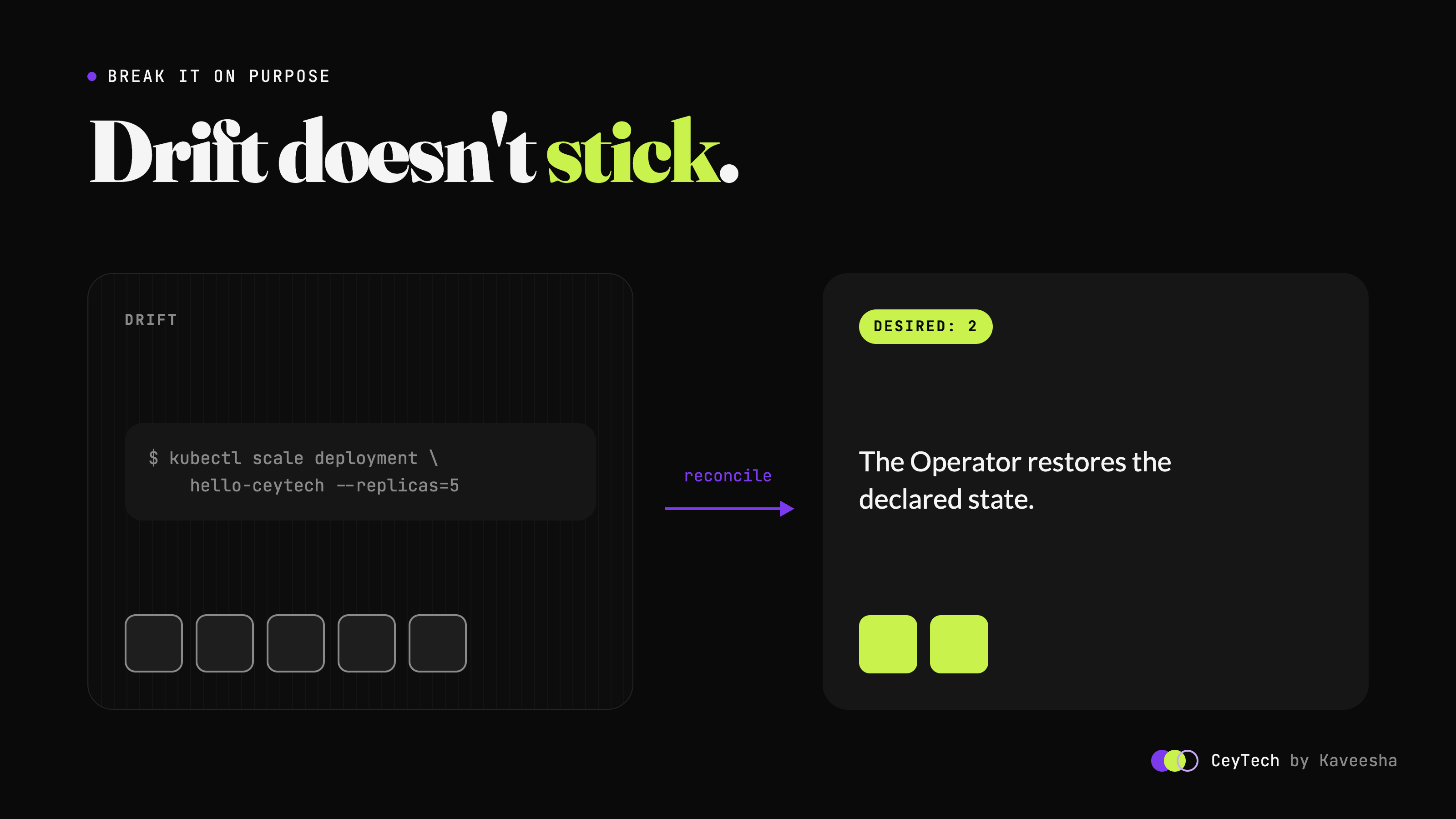
Scale the Deployment by hand.
kubectl scale deployment hello-ceytech --replicas=5
kubectl get deployment hello-ceytech -w
Within moments it’s back to 2. The Deployment change triggered a reconcile, the controller compared it with the Website spec, and corrected the drift.
Delete the Deployment entirely.
kubectl delete deployment hello-ceytech
kubectl get deployment hello-ceytech
It comes straight back.
Change the spec the proper way.
kubectl patch website hello-ceytech --type=merge -p '{"spec":{"replicas":3}}'
Now 3 is the new truth, and that’s what the Operator enforces.
Try an invalid value.
kubectl patch website hello-ceytech --type=merge -p '{"spec":{"replicas":0}}'
The API server rejects it with an Invalid value error for spec.replicas, thanks to a single validation marker.
Delete the Website.
kubectl delete website hello-ceytech
kubectl get deployment,service -l app.kubernetes.io/instance=hello-ceytech
You should see No resources found. Owner references at work.
Sound familiar? It’s the same idea as GitOps: continuous reconciliation against a declared desired state. Argo CD and Flux are themselves controllers running this exact loop.
Step 8: Deploy it into the cluster
make run is great for development, but a real Operator runs inside the cluster as a Deployment. Stop the local process, then build the image, load it into kind and deploy:
make docker-build IMG=website-operator:v0.1.0
kind load docker-image website-operator:v0.1.0 --name operator-lab
make deploy IMG=website-operator:v0.1.0
On kind, the image is loaded directly into the node. A tagged image like
v0.1.0defaults toimagePullPolicy: IfNotPresent, so no registry is needed. For a real cluster, push to a registry withmake docker-pushinstead.
Check that the controller is running and follow its logs:
kubectl get pods -n website-operator-system
kubectl logs -n website-operator-system deployment/website-operator-controller-manager -f
Apply your sample again and you’ll see the same behaviour, this time with the controller running as a proper workload, using the ServiceAccount and RBAC generated from your markers.
When you’re done, clean up:
make undeploy
make uninstall
kind delete cluster --name operator-lab
Common first-operator mistakes
A few things catch almost everyone the first time:
- Forgetting RBAC markers. Everything works with
make run, which uses your admin kubeconfig, then fails withforbiddenonce deployed. Always runmake manifestsafter changing markers. - Non-idempotent reconcile. Using
Createinstead ofCreateOrUpdateleads toAlreadyExistserrors on the second loop. - Writing status with
Updateinstead ofStatus().Update. With the status subresource enabled, a normal update quietly ignores status changes. - Replacing whole structs in the mutate function. It wipes server-set defaults and triggers an update on every reconcile.
- Thinking in events instead of states. Don’t try to work out what changed. Compare desired with actual and fix the difference.
Where to go next
You now have the core of every Operator. Production Operators build on the same foundation with a few more pieces:
- Finalizers run cleanup logic for external resources, such as cloud load balancers or DNS records, before an object is deleted.
- Webhooks handle defaulting and validation that’s too complex for markers, via
kubebuilder create webhook. - envtest lets you test your controller against a real API server binary, and the scaffold already includes a test suite for it.
- Operator SDK and OLM handle packaging and lifecycle management when you distribute your operator.
- GitOps delivery closes the loop: commit your
Websiteresources to Git and let Argo CD apply them, so your operator and your pipeline work together.
The Kubebuilder Book is the best next stop. Its CronJob tutorial goes deeper into everything covered here, and the controller-runtime docs are worth bookmarking.
This post is part of the CeyTech series breaking down CNCF technologies, one at a time—deep tech, no fluff. If you build this, tell me what you made your first operator manage.
Comments (...)
You must be signed in to join the discussion.